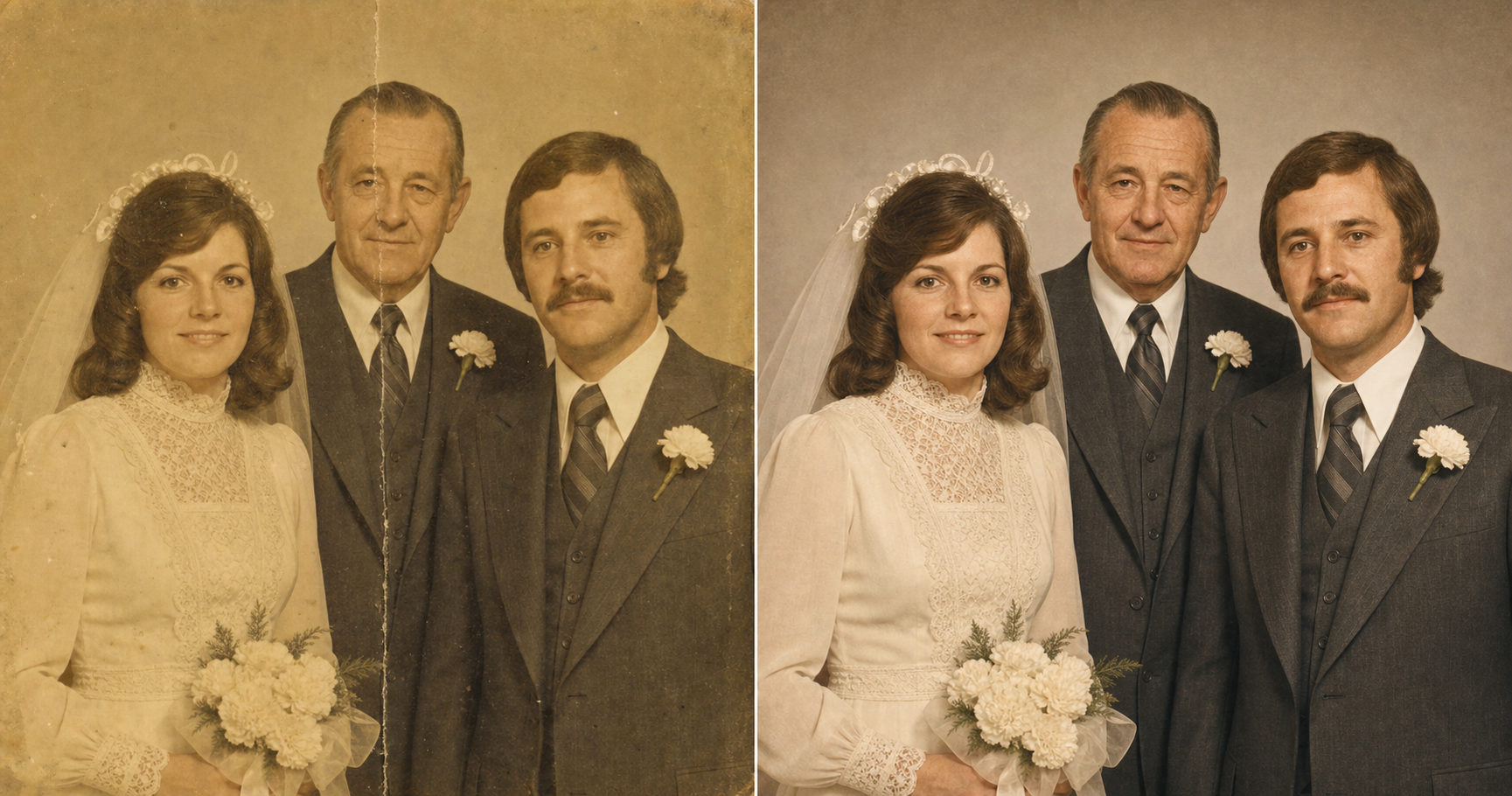
A woman is handed back her mother’s 1974 wedding photo. She holds it close, then far, then close again. Her father, gone since 2009, is sharp in the picture for the first time in fifteen years. The boutonnière on his lapel is readable. The eyes are exactly the eyes she remembers. The reason that photo lands instead of looking like a stranger from the right era is one line in the prompt: identity preservation is the highest-priority constraint. Every other AI restoration she’d tried changed the face. This one didn’t.
Why every AI photo tool changes Grandma’s face
Default AI restorers have a quiet habit: they prettify. They smooth the skin, soften the jaw, modernize the haircut, and average the face toward something more conventionally attractive. The bride still looks like a bride. She just doesn’t look like Mom anymore.
The name for that failure mode is identity drift. It’s the same thing that makes most AI photos look fake in the first place: the model leans on the boring center of its training data and quietly redraws the person into something more generic. On a fresh portrait, identity drift is annoying. On a fifty-year-old family photo, it’s the entire reason the restoration doesn’t work. The face is the thing.
This is why MemoryCherish, Remini, and a bare ChatGPT upload-and-ask all tend to come back wrong. The tool is doing what tools do. It improves the image. The image you don’t want improved is the face. You want the damage fixed and the person left exactly alone.
Which is why the fix isn’t a new tool. It’s four lines in the prompt.
What you need before you start
Three things, all of which you already have.
- A clear phone snapshot of the print. A picture taken with your phone, in good light, on a flat surface. No scanner. No app. No descreening, no Photoshop, no skill in any of the above.
- The prompt below. Paste-and-go. Two placeholders to swap.
- An AI image tool you’ve already opened at least once. ChatGPT, Claude, Gemini, or any other tool that accepts a photo upload and returns an image.
The work isn’t in the scanner. The work is in four lines of the prompt.
The prompt: paste, swap two lines, upload
Upload the phone snapshot of the print first. Then paste the block below into ChatGPT (or Claude, Gemini, or any AI image tool), and swap the two placeholders for your era and your damage.
View & copy the full promptpaste-ready · identity-locked
**Generate this image:**

A single photoreal restored version of the uploaded old photograph, returned in the same aspect ratio and composition as the original. Identity preservation is the highest-priority constraint — match every person in the uploaded photo's bone structure, eyes, nose, lips, proportions, hairline, and skin tone exactly; do not invent new facial features, do not modernize anyone's appearance, do not change anyone's age. The restored image fixes the damage typical of an aged print — yellowing / fading / color shift / scratches / dust / soft creases / small tears / mild blur — and rebuilds clean color and tonal range so the photo looks the way it would have on the day it was taken. Keep the {ERA_HINT} period correct — same hairstyles, same clothing, same accessories, same furniture and background as the original. Address {DAMAGE_NOTES} specifically. Sharpness is brought up to a clear, naturally detailed print — not over-sharpened, not airbrushed. Preserve authentic film grain and paper-print micro-texture where it exists in the original. The final image looks like a well-preserved original print, not a digitally retouched modern photo.

**Rules the AI must follow:**
- Aspect ratio: match the uploaded photo's original aspect ratio exactly — do not crop, do not re-frame, do not change the composition; stated at the start and the end of the prompt
- Identity is the highest-priority constraint — every face must remain unmistakably the same person; do not "prettify" anyone, do not adjust noses / jaws / eye shapes, do not change ages, do not remove glasses, beards, moles, or scars
- Period accuracy — keep hairstyles, clothing styles, fabrics, jewelry, makeup, eyewear, furniture, and background details consistent with the original era; no modern updates
- Realistic film / paper texture required — preserve natural film grain, subtle paper grain, and natural skin micro-texture (visible pores, fine lines, slight asymmetry); no AI-plastic smoothing, no porcelain skin, no airbrushed look
- No new objects, no new people, no new background elements — fill small damaged areas only by reconstructing what was clearly there originally; do not invent content for large missing regions, leave them as in the source
- No text, no captions, no watermarks, no date stamps added; if a date / studio name / handwriting exists on the original photo, preserve it exactly as it appears
- Single image output — one restored photo, same aspect ratio as the original; no before/after split, no side-by-side comparison, no contact sheet
- Output the image directly without explaining the prompt back
- All text in English Latin script if any incidental signage appears

**Replace these placeholders with your details:**
- ⚠️ **REQUIRED — upload before pasting**: the original old / faded / damaged photo (this is what the AI restores — without it the AI will hallucinate a different photo entirely; if there's a scan or phone snapshot, that's fine)
- {ERA_HINT} = 1970s family portrait (or pick yours — e.g. "1940s wartime studio portrait", "1985 birthday party snapshot", "1960s wedding")
- {DAMAGE_NOTES} = the photo has yellowed, soft creases through the middle, and a faded face on the left (or describe yours — e.g. "torn corner missing", "water stain on the right side", "deep scratch across the face", "very blurry — needs sharpening")
Three things to know about that block before you paste it.
- The upload is required. Without the original photograph attached, the AI has nothing to anchor on. It will generate a different photograph entirely.
- {ERA_HINT} is what you write to keep the period correct. “1974 family wedding portrait” works. “1948 wartime studio portrait” works. “1985 birthday party snapshot” works. The hint locks the hairstyles, the clothing, the makeup, and the furniture to the right decade.
- {DAMAGE_NOTES} is the line that tells the AI what to repair. “The photo has yellowed, soft creases through the middle, and a faded face on the left.” Plain English. The more specifically you describe the damage, the less the AI has to guess.
Those four lines do the work the restoration shop wants $200 for.
Why this prompt doesn’t change the face
The methodology moat is four rules. Each one is doing a specific job. Drop any one and you get the stranger’s face.
- Identity preservation is the highest-priority constraint. The line is stated first, and it’s the only rule the prompt calls “highest priority”. The AI is instructed to match bone structure, eyes, nose, lips, proportions, hairline, and skin tone exactly. Not approximately. Exactly.
- No prettifying. The AI is told not to adjust noses or jaws or eye shapes, not to change anyone’s age, and not to remove glasses, beards, moles, or scars. The wrinkles around Grandpa’s eyes are the wrinkles. The mole on Mom’s cheek stays put.
- Period accuracy is locked. Hairstyles, fabrics, jewelry, makeup, eyewear, furniture: all stay in the era of the original. No modern updates. The 1974 bouffant doesn’t become a 2020s loose wave.
- Real film and paper texture is required. Natural film grain, subtle paper grain, and natural skin micro-texture stay. No AI-plastic smoothing. No porcelain skin. No airbrushed look. Real photographs have pores.
The shorthand is: the prompt is allowed to repair the damage, and only the damage. Skip any one of those four and the AI takes liberties. It smooths, modernizes, prettifies, plastics. You get a different person from the right decade. The four rules together are what separates restored from redrawn.
What the prompt holds when it works
Look at the hero image at the top of this article one more time.
The same three people are in both halves. The yellow cast is gone on the right. The crease through the middle is gone. The lace pattern on the dress is readable now. The boutonnière on the bride’s father’s lapel is clearly a small white carnation. All three faces are unmistakably the same three people: same bone structure, same eye shape, same hairline, same age.
The thing to notice is what the prompt didn’t do.
It didn’t make the bride’s father younger. It didn’t soften the groom’s jaw. It didn’t update the bride’s hair to a 2020s style. It didn’t airbrush anyone. It didn’t invent guests in soft focus behind them. The studio backdrop on the right is the same studio backdrop, slightly lighter where the original was darkened by age.
That restraint is the whole reason the photo lands. The woman handed her father back didn’t say “what a nice restoration.” She said his name out loud.
One paste-ready AI move a week. The kind you can use on a Tuesday or a Sunday. Subscribe to the newsletter.
Five damage types and what to write in {DAMAGE_NOTES}
Same prompt. Five different damage profiles. The shape of the prompt is the shape of the answer. What changes between examples is one line.
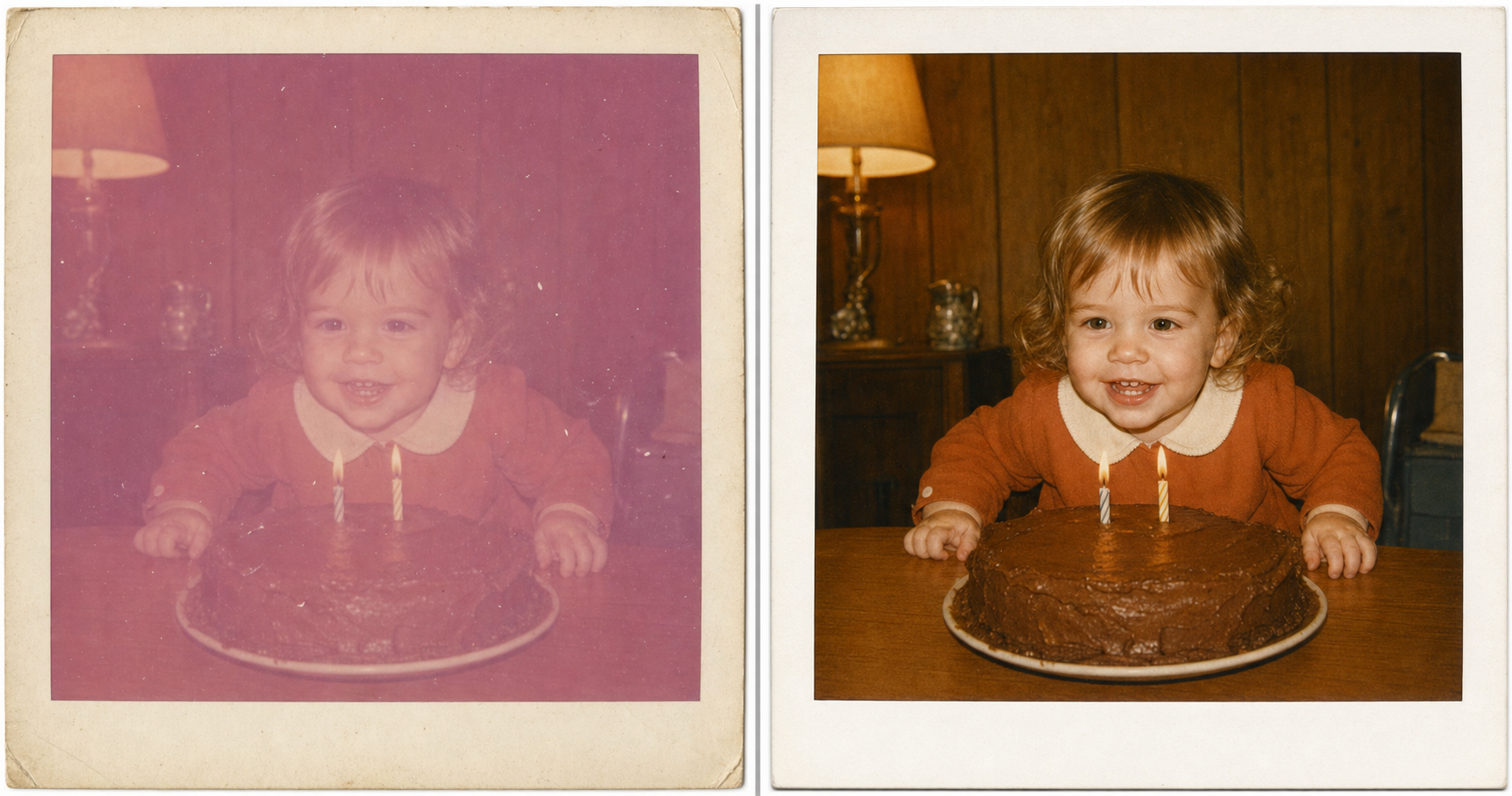
Polaroid fade
{DAMAGE_NOTES} = “heavy magenta-pink color cast across the whole photo, light dust spots, the white Polaroid border is cream-stained.” The 1972 toddler is the same toddler. The candle flames stay warm. The Polaroid border on the right is still cream-tinted slightly, because that’s what period-correct Polaroid borders look like. The AI doesn’t bleach it to pure white. The gap-tooth smile is the proof of identity.
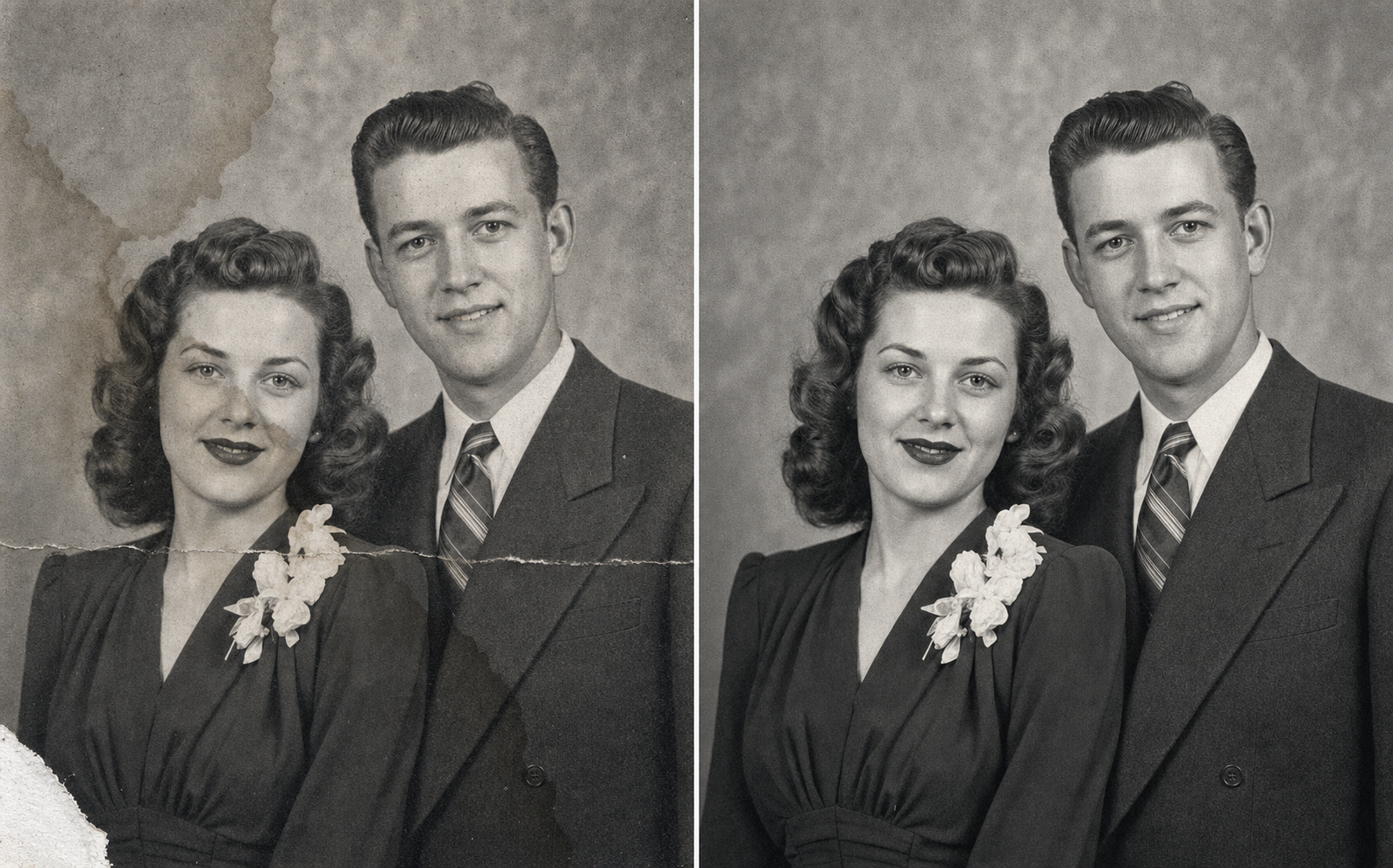
Water stain and corner tear
{DAMAGE_NOTES} = “amber-brown water stain crossing the upper background, small torn corner in the lower-left, soft horizontal crease across the chest, keep the photo black-and-white.” The note that does the most work is the last one. Without it, the AI will quietly colorize. The 1948 portrait is meant to stay in pure black-and-white silver gelatin, and the prompt body’s rule about not inventing new content for large missing regions stops the AI from inventing furniture inside the torn corner.
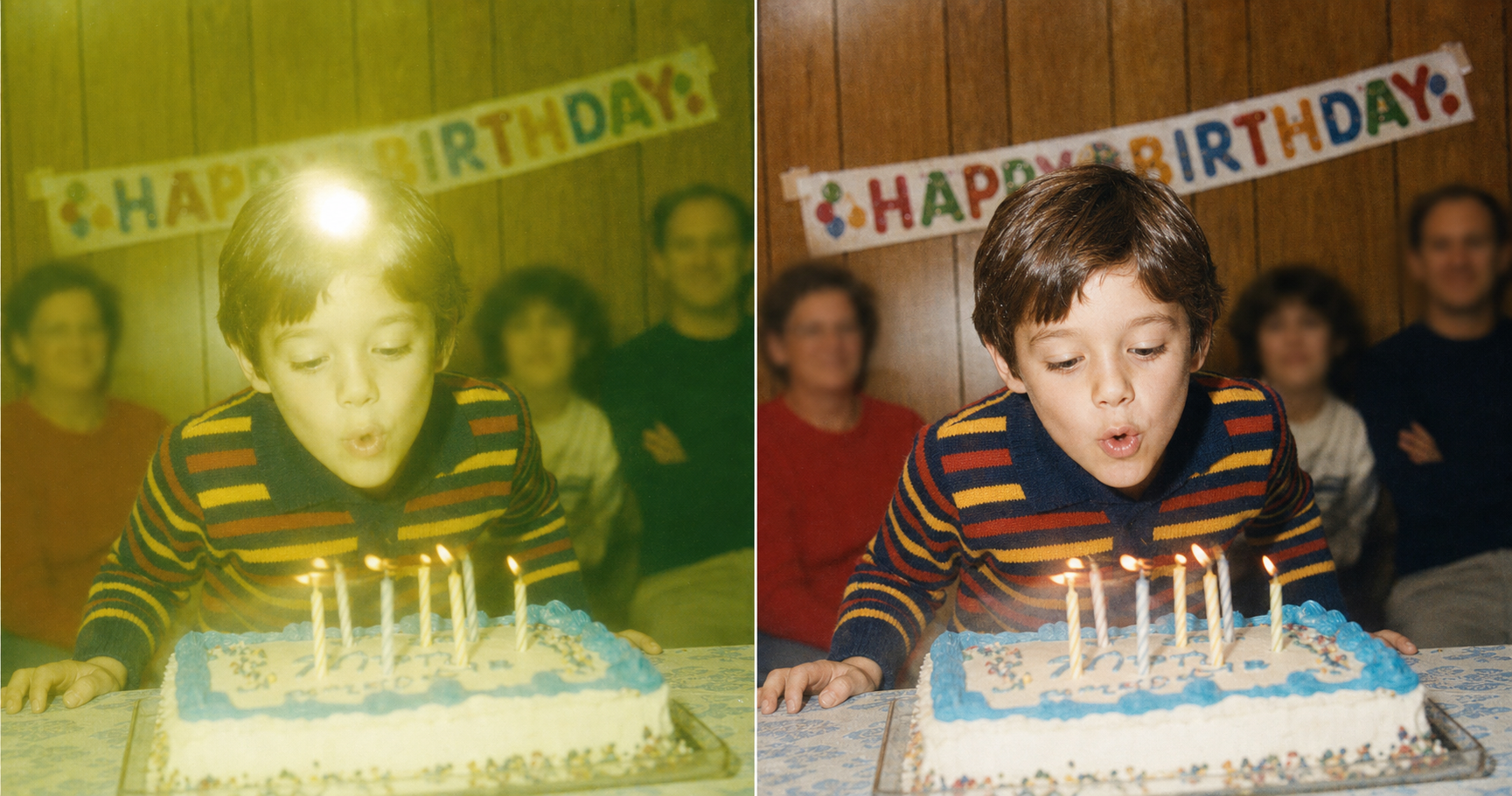
Flash glare and motion
{DAMAGE_NOTES} = “on-camera flash glare on the forehead, green-yellow color cast across the whole image, motion blur on the mouth and hands, the moment was in motion, leave a little motion in the candles.” The point is that motion blur isn’t always damage. Sometimes it’s the proof that the candles were being blown out. The prompt is told to soften the blur, not eliminate it.
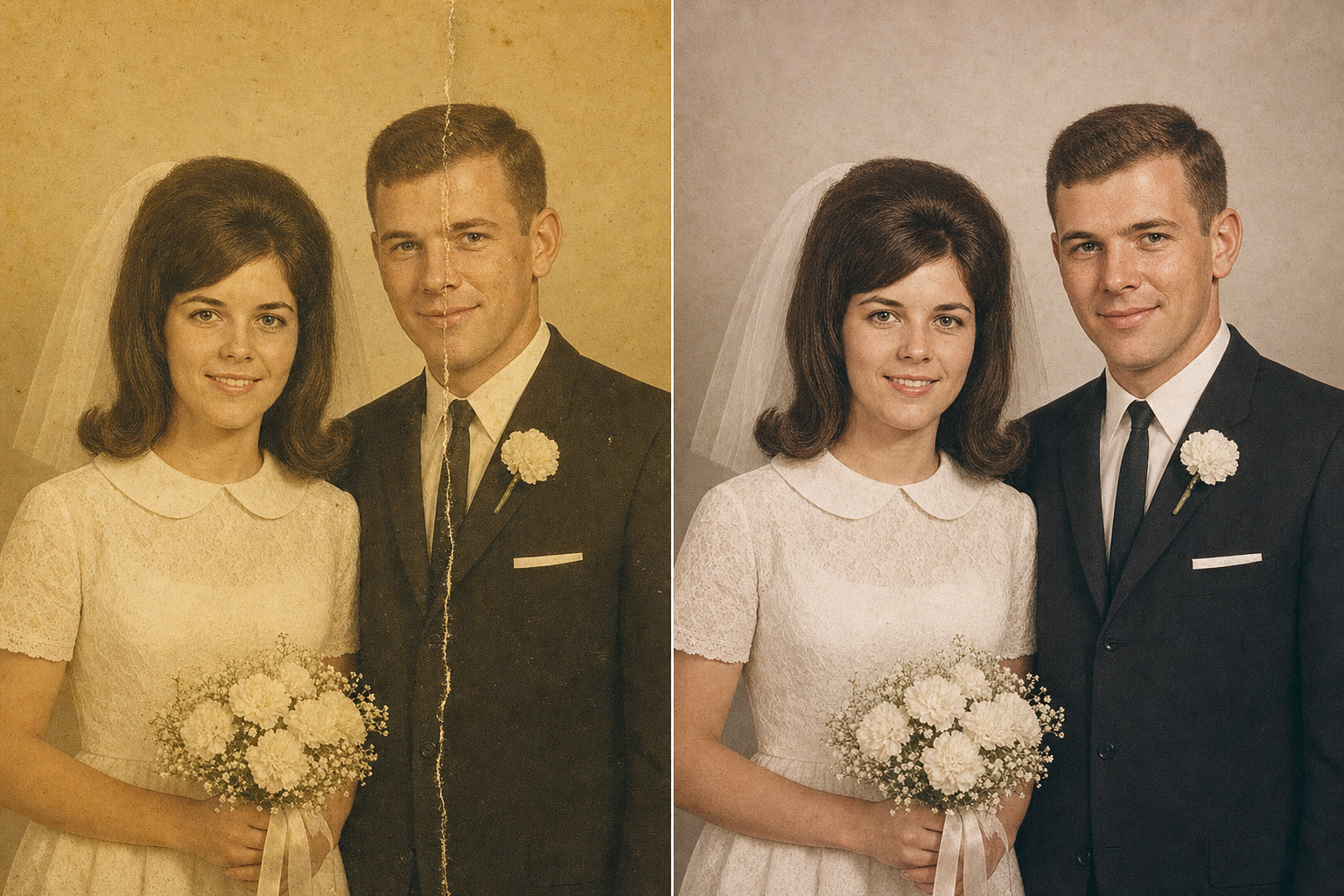
Crease through a face
{DAMAGE_NOTES} = “heavy yellowing across the print, hard vertical crease running through the groom’s face from forehead to jaw, preserve his exact bone structure, jawline, and hairline through the repaired region.” This is the toughest test the prompt gets in normal use. The groom’s face has been physically split. The AI has to reconstruct what was clearly there, anchored to the parts of his face visible on either side of the crease. The right-hand version has the crease gone and the groom recognizable as himself.
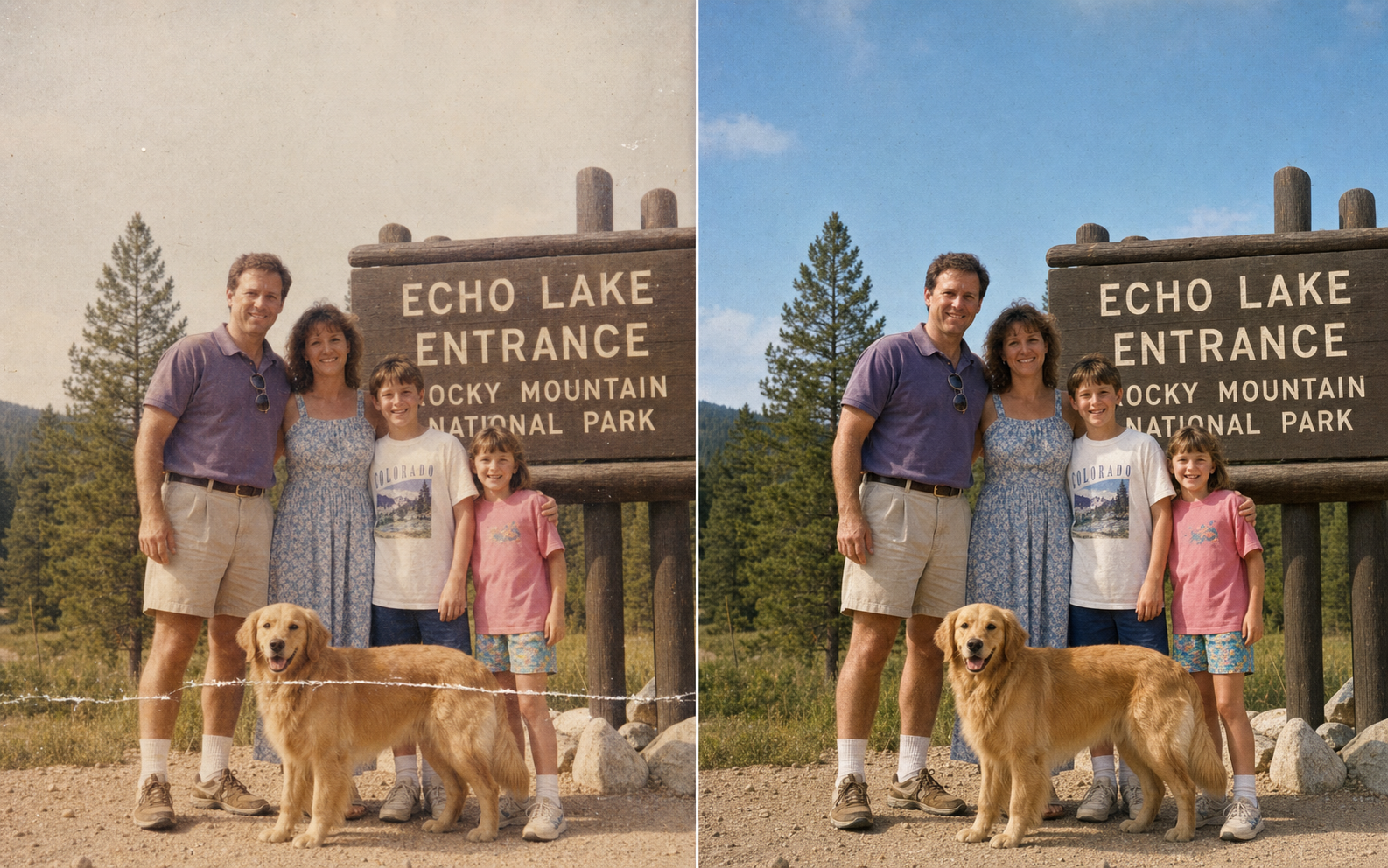
Sun fade and scratch
{DAMAGE_NOTES} = “sky and skin tones sun-faded toward pale grey, long horizontal scratch across the lower third running over the dog’s body, reconstruct only what was clearly there, do not invent new ground.” The last clause matters. Without it, the AI might invent grass, shoes, a different patch of dirt, even a different dog. With it, the AI keeps the same golden retriever, the same family, the same national-park sign in the background.
One block. Five swaps. Screenshot the next card; send it to the sibling who’s about to do hers too.
The cost gap is real. Here’s where the $200 you don’t spend goes when you don’t spend it.
| The prompt ($0 if you have ChatGPT) | The pack ($19, paste-ready) | Local restoration shop | High-end hand retoucher | |
|---|---|---|---|---|
| Cost | $0 with the AI image tool you already have | $19 one-time for the full pack of 125 prompts | $50–$300 per photo, mid-band $200 | $300+ per photo for serious damage jobs |
| Turnaround | ~10 minutes | ~10 minutes once you’ve pasted | 1–4 weeks | 2–6 weeks |
| Iterations | Unlimited until the face reads as Grandma | Unlimited | None. You get what they send. | Limited revision rounds |
| Identity fidelity | Locked by the prompt’s first rule | Same prompt, same lock | Depends on the retoucher | Best-in-class for severe damage |
| Best for | A normal phone snapshot of a yellowed print, faces still readable | The same job + 124 other family-photo and gift prompts | Mid-damage prints you don’t trust an AI with | Whole-face-torn-off, severe water damage, missing chunks |
| Worst for | Whole-face-torn-off prints (use a hand retoucher) | Same as the prompt | Light damage you could have done in ten minutes | Light damage (overspending) |
If you’d rather skip the prompt-writing entirely and just paste-and-go on the next family-photo job (restoring, colorizing, combining, framing), the full prompt and twenty-four more like it sit inside the $19 image prompt pack, all baked with the same identity-preservation rules.
When this prompt is the wrong tool
Honesty saves the $200 you’d otherwise have paid for the wrong job.
- A whole face has been torn off. The prompt explicitly forbids inventing content for large missing regions. If the damage is “the face is gone”, the AI will return a photo with the face still missing. That job belongs to a hand retoucher.
- The damage is heavily mixed-media. Mold, severe water damage, fire damage, multiple kinds of damage layered on top of each other in the same square inch. The prompt handles damage cleanly; it doesn’t handle damage in tangles.
- You want it colorized AND aged-up AND turned into a painting. The prompt does one job: restore the original photo. If the gift you want is “Grandpa colorized, twenty years younger, in oil paint”, that’s a different prompt. Don’t make this one stretch.
Knowing the line saves you the spend on a job the prompt was never going to win. Send the impossible cases to a paid restorer. Run the normal cases yourself.
Print it, frame it, hand it over
The last ten minutes are mechanical.
Download the restored photo at the largest size the tool offers. PNG, not JPEG, so the restoration gradients don’t lose detail in compression. Print 5×7 or 8×10 at Target’s same-day photo service or Walgreens. A few dollars either way. Frame it in an 8×10 from Target or Michaels for around $12 to $18.
The total spend is under twenty dollars. The total wall-clock is under an hour, if you’re slow about choosing the frame.
The thing you’re holding when you sit at the kitchen table to give it to Mom, that’s the whole point. Not “AI photo restoration.” A face on the kitchen table that she says the name out loud to.
FAQ
Q: Will this work on a phone photo of the print, or do I need a scanner?
A: A phone photo is enough. Lay the print on a flat surface in good even light, take a straight-on snapshot with your phone, and upload that. No scanner, no app, no descreening. The prompt asks the AI to work from “the uploaded photo”. It does not care whether that upload came from a $400 scanner or the camera in your pocket. The only failure mode at the upload step is glare on the print or a steep angle. Both are easy to avoid; both look obvious when you preview the snapshot before uploading.
Q: Why did MemoryCherish and the default ChatGPT upload change my grandma’s face, and will this prompt actually fix that?
A: They changed the face because their defaults treat your photo like any other image. They improve it. Improving a face means averaging it toward something more conventionally attractive, smoothing the skin, modernizing the haircut. That’s identity drift, and on a family photo it’s the entire reason the result looks wrong. This prompt fixes it by making identity preservation the highest-priority constraint and naming the specific things the AI is forbidden to “improve”: bone structure, eye shape, nose, lips, hairline, age, glasses, beards, moles, scars. The AI is still allowed to fix the damage. It is not allowed to fix the person.
Q: Can ChatGPT really do this for free, or do I need a paid plan?
A: Most readers can run this with the AI image tool they already have open. ChatGPT, Claude, and Gemini all accept a photo upload and can return an image. Free-tier specifics shift across the year and across providers; the prompt itself is tool-agnostic, so whatever you’ve already got an account on is fine. If your particular tool throttles image generation on the free tier, the workaround is patience or any of the alternatives, not a new $19/month subscription.
Q: What if the photo has a whole face torn off? Can AI rebuild it?
A: Not with this prompt, and honestly, not with any prompt that’s worth pasting. The block above explicitly forbids inventing content for large missing regions, because the alternative is the AI making up a face that isn’t your relative’s. If a face has been physically torn off the original, send the photo to a hand retoucher. That’s the one case where the $200 to $300 quote is buying something a paste-and-go cannot.
Q: How big can I print the restored photo without it looking pixelated?
A: Most AI image tools return restored photos at sizes that print cleanly at 5×7 or 8×10, about 1,500 by 2,100 pixels at 300 dpi. If the source phone snapshot was high-resolution, the restored version usually clears that bar. If you want to print larger than 8×10, add a line to {DAMAGE_NOTES} like “upscale resolution to print-ready quality at 11×14 while preserving authentic grain and softness.” The prompt body already covers that case in its bonus tips.
Q: Is it okay to share or sell prints of family photos I restored this way?
A: Sharing with family is fine; printing for the family is fine. Selling restored prints publicly is a different question because the underlying photograph may have a photographer’s copyright (especially studio wedding portraits from a working photographer). For private family use (Mom’s kitchen, Grandpa’s mantel, the album you’re making for your sister), the answer is yes. For listings on Etsy or any other public storefront, check the rights on the original before listing.
Key Takeaways
- Default AI restorers change the face because they “improve” it: smoothing, modernizing, averaging toward attractive. The failure mode has a name. Identity drift.
- The fix is at the prompt layer, not the tool layer. Four load-bearing rules (identity preservation as highest priority, no prettifying, period accuracy locked, real film and paper grain) separate restored from redrawn.
- Same prompt handles five wildly different damage profiles: Polaroid fade, water stain and tear, flash glare and motion, crease through a face, sun fade and scratch. The shape of the prompt is the shape of the answer; one line in
{DAMAGE_NOTES}swaps. - The cost gap is a tenth of the restoration shop’s quote: $0 in the tool you already have or $19 for the full pack of prompts, versus $50–$300 mid-banded at $200 for a local shop, versus $300+ for a high-end retoucher. The risk gap is a face on the mantel that says the name out loud, versus a face that doesn’t.
What’s the photo in your drawer?
That’s the only question worth answering today. Find the one photograph that’s been waiting fifteen years on the hallway wall, and run it through the same pack of prompts. The prompt above is one of them; another is the pencil-sketch portrait prompt for the next gift on the calendar. The rest cover the twenty-three other family-photo jobs a normal lifetime asks of you.